Tuesday, March 30, 2021

PySpark Demo


dataDictionary = [
        ('James',{'hair':'black','eye':'brown'}),
        ('Michael',{'hair':'brown','eye':None}),
        ('Robert',{'hair':'red','eye':'black'}),
        ('Washington',{'hair':'red','eye':'grey'}),
        ('Jefferson',{'hair':'red','eye':''})
        ]

df = spark.createDataFrame(data=dataDictionary, schema = ["name","properties"])
df.printSchema()
df.columns
df.count()
df.select('name')
df.show(truncate=False)

dict2 = [
('James','James_last'),
('Michael','Michael_last'),
('Wendy', 'Wendy_last')
]
df2 = spark.createDataFrame(data=dict2, schema=['name','name_last'])
df2.show()

df.createOrReplaceTempView("PER")
spark.sql('select name from per where name like "J%"').show()

df2.createOrReplaceTempView("PER_LAST")
spark.sql('select * from per p1 full outer join per_last p2 on p1.name=p2.name').show()

spark.sql('select p1.name from per p1 full outer join per_last p2 on p1.name=p2.name').rdd.map(lambda x:x['name']).collect()
# ['James', 'Washington', 'Michael', 'Robert', 'Jefferson', None]

#Create PySpark DataFrame from Pandas
sparkDF = spark.createDataFrame(pandasDF) 

Download SSL / TLS certificates using Python

import OpenSSL
import ssl

hostname='www.google.com'
port=443

cert = ssl.get_server_certificate((hostname, port))
x509 = OpenSSL.crypto.load_certificate(OpenSSL.crypto.FILETYPE_PEM, cert)

x509.digest('sha256')
# b'0A:E6:46:01:80:9F:C7:33:84:19:6A:DD:6C:8E:5F:95:5C:F6:F2:75:46:32:1E:C9:61:1D:88:DA:9A:A9:B4:

x509.get_subject()
# <X509Name object '/C=US/ST=California/L=Mountain View/O=Google LLC/CN=www.google.com'

x509.get_notBefore().decode()                                                                                                                          # '20210311144716Z'

Monday, March 29, 2021

Kafka

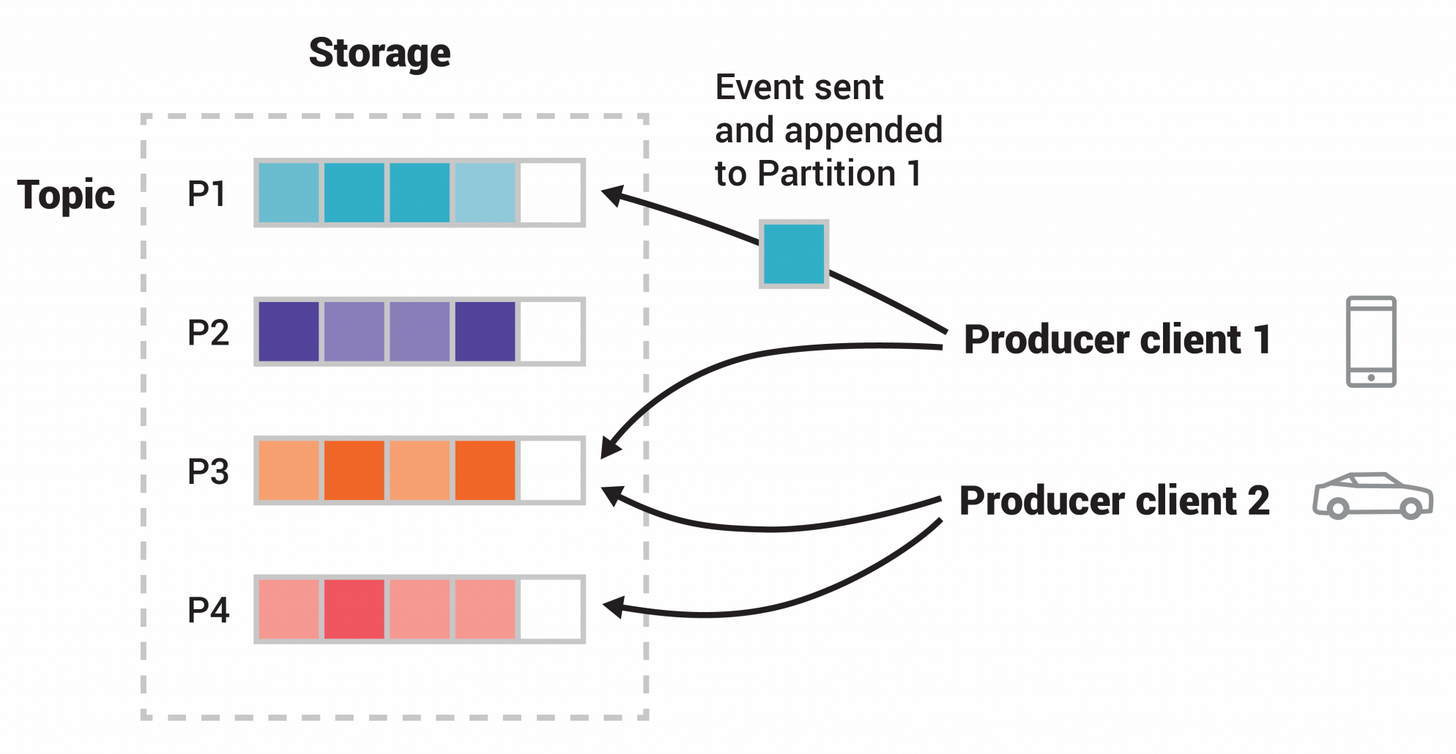
Kafka is an asynchronous messaging queue. Kafka consumer, consumes message from Kafka and does some processing like updating the database or making a network call.

https://kafka.apache.org/documentation/


What is Apache Kafka? Why is it so popular? Should you use it?

https://techbeacon.com/app-dev-testing/what-apache-kafka-why-it-so-popular-should-you-use-it


What, why and How Apache Kafka

https://www.startdataengineering.com/post/what-why-and-how-apache-kafka/


Kafka partitions

https://www.educba.com/kafka-partition/


Getting started with Apache Kafka in Python

https://towardsdatascience.com/getting-started-with-apache-kafka-in-python-604b3250aa05


How can Kafka consumers parallelise beyond the number of partitions

https://medium.com/@jhansireddy007/how-can-kafka-consumers-parallelise-beyond-the-number-of-partitions-a0a46ade8a6c


PySpark Streaming

https://stackoverflow.com/questions/62342080/how-to-programmatically-load-and-stream-kafka-topic-to-a-pyspark-dataframe#62342332


Connecting the Dots (Python, Spark, and Kafka)

https://www.rittmanmead.com/blog/2017/01/getting-started-with-spark-streaming-with-python-and-kafka/


Parquet format at Twitter

Compressed columnar format (per Row group < 1GB) for Hadoop

Efficient scan with compression. Parquet supports deeply nested structures, efficient encoding and column compression schemes, and is designed to be compatible with a variety of higher-level type systems.

https://www.youtube.com/watch?v=Qfp6Uv1UrA0


Hybrid storage model (horizontal row groups and vertical column chunks partitioning)

https://www.youtube.com/watch?v=1j8SdS7s_NY

Row group filtering through predicate pushdown. Each row group has min-max stats for each predicate for fast filtering. Use dictionary filtering to filter by exact values.

Optimization: avoid many small files (too many stats/footer, overhead) and few huge files (>1 GB?). Need to repartition data.   

Automatic repartition using Delta Lake.


Spark Reading and Writing to Parquet Storage Format

https://www.youtube.com/watch?v=-ra0pGUw7fo

df.select('mycol','bla').write.partitionBy('mycol').mode(SaveMode.Append).format('parquet').save('/tmp/foo')


How Adobe Does 2 Million Records per second using Apache Spark

https://www.youtube.com/watch?v=rPgoPHAEYAM

val kafka = spark.readStream.format('kafka').option(...).load()


Read Parquet Files in Python

https://www.youtube.com/watch?v=XFO5jdGsMek

pip install pandas

pip install pyarrow

pd.read_parquet(parquet_file, engine='auto')

*parquet_file can be a single parquet file or a folder of parquet files

Thursday, March 25, 2021

Towards data science

towardsdatascience.com blog

Boyer-Moor Exact Pattern Matching Algorithm

https://www.youtube.com/watch?v=4Xyhb72LCX4

Boyer–Moore string-search algorithm - Wikipedia

O(n + m) where n and m are lengths of p (search pattern) and t (text to search)


advantages

  1. skip alignments
  2. doesn't compare all the characters

Try alignments from left-to-right and compare characters in the alignment from right-to-left 


Bad character rule - if a mismatched character is found going from right-to-left then shift the pattern to the right until a matching character in the pattern is found

Good suffix rule - shift until the good matching suffix matches

Try both rules and shift by the largest amount of shift


number of characters to shift is stored in a lookup table which is created using only the search pattern


 The algorithm preprocesses the string being searched for (the pattern), but not the string being searched in (the text). It is thus well-suited for applications in which the pattern is much shorter than the text or where it persists across multiple searches. The Boyer–Moore algorithm uses information gathered during the preprocess step to skip sections of the text, resulting in a lower constant factor than many other string search algorithms. In general, the algorithm runs faster as the pattern length increases. The key features of the algorithm are to match on the tail of the pattern rather than the head, and to skip along the text in jumps of multiple characters rather than searching every single character in the text.

Wednesday, March 24, 2021

Tuesday, March 23, 2021

BOTORCH: A Framework for Efficient Monte-Carlo Bayesian Optimization

 BOTORCH: A Framework for Efficient Monte-Carlo Bayesian Optimization

To address these problems, we developed BoTorch, a framework for Bayesian optimization research, and Ax, a robust platform for adaptive experimentation. BoTorch follows the same modular design philosophy as PyTorch, which makes it very easy for users to swap out or rearrange individual components in order to customize all aspects of their algorithm, thereby empowering researchers to do state-of-the art research on modern Bayesian optimization methods. By exploiting modern parallel computing paradigms on both CPUs and GPUs, it is also fast.

Core Data Science researchers discuss research award opportunity in adaptive experimentation

Sunday, March 21, 2021

SQL Challenge

 https://www.hackerrank.com/challenges/revising-the-select-query/problem


Easy

1. Query all columns for all American cities in the CITY table with populations larger than 100000. The CountryCode for America is USA.

select * from City where population > 100000 and CountryCode='USA'

2. Query the NAME field for all American cities in the CITY table with populations larger than 120000. The CountryCode for America is USA.

The CITY table is described as follows:

select Name from City where population > 120000 and CountryCode='USA' 

3. Query a list of CITY names from STATION for cities that have an even ID number. Print the results in any order, but exclude duplicates from the answer.

select distinct City from Station where mod(id,2)=0 


Medium 

1. Query an alphabetically ordered list of all names in OCCUPATIONS, immediately followed by the first letter of each profession as a parenthetical (i.e.: enclosed in parentheses). For example: AnActorName(A), ADoctorName(D), AProfessorName(P), and ASingerName(S).

select * from (select concat('There are a total of ',count(occupation),' ',lower(occupation),'s.') as stat from occupations group by occupation) as innertable order by innertable.stat;

2.  Pivot the Occupation column in OCCUPATIONS so that each Name is sorted alphabetically and displayed underneath its corresponding Occupation. The output column headers should be Doctor, Professor, Singer, and Actor, respectively.

Note: Print NULL when there are no more names corresponding to an occupation.

https://codingsight.com/pivot-tables-in-mysql/

User nobuh:

select  
    max(if(occupation='Doctor', name, null)) as docname,
    max(case when occupation='Professor' then name else null end) as profname,
    max(case when occupation='Singer' then name else null end) as singername,
    max(case when occupation='Actor' then name else null end) as actorname
    from (
    select 
        a.occupation, 
        a.name,
        (select count(name) from occupations b where a.occupation=b.occupation and a.name > b.name) as name_rank
    from occupations a
) as rank_summary
group by name_rank
order by name_rank

name_rank:

select 
        a.occupation, 
        a.name,
--         get the name rank by comparing the names
        (select count(name) from occupations b where a.occupation=b.occupation and a.name > b.name) as name_rank
from occupations a
order by name_rank;

Output:
Doctor Aamina 0
Actor Eve 0
Singer Christeen 0
Professor Ashley 0
Doctor Julia 1
Singer Jane 1
Professor Belvet 1
Actor Jennifer 1
Actor Ketty 2
Singer Jenny 2
Doctor Priya 2
Professor Britney 2
Singer Kristeen 3
Professor Maria 3
Actor Samantha 3
Professor Meera 4
Professor Naomi 5
Professor Priyanka 6


3. You are given a table, BST, containing two columns: N and P, where N represents the value of a node in Binary Tree, and P is the parent of N.

Write a query to find the node type of Binary Tree ordered by the value of the node. Output one of the following for each node:

Root: If node is root node.

Leaf: If node is leaf node.

Inner: If node is neither root nor leaf node.

Answer

select * from bst;
select distinct '------' from bst;
select * from (
select n,'Root' from bst bo where bo.p is null
union all
select n,'Inner' from bst bo where bo.p is not null and bo.n in (select bi.p from bst bi where p is not null)
union all
select n,'Leaf' from bst bo where bo.p is not null and bo.n not in (select bi.p from bst bi where p is not null)
) tmp
order by n;

Output
1 2
3 2
5 6
7 6
2 4
6 4
4 15
8 9
10 9
12 13
14 13
9 11
13 11
11 15
15 NULL
------
1 Leaf
2 Inner
3 Leaf
4 Inner
5 Leaf
6 Inner
7 Leaf
8 Leaf
9 Inner
10 Leaf
11 Inner
12 Leaf
13 Inner
14 Leaf
15 Root

 4. Given the table schemas below, write a query to print the company_code, founder name, total number of lead managers, total number of senior managers, total number of managers, and total number of employees. Order your output by ascending company_code.

https://www.hackerrank.com/challenges/the-company/problem

SQL

select c.company_code,founder
,count(distinct lead_manager_code)
,count(distinct senior_manager_code)
,count(distinct manager_code)
,count(distinct employee_code)
from company c left join employee e on c.company_code=e.company_code group by c.company_code,founder
order by cast(substr(c.company_code,2,5) as UNSIGNED);

Output

C1 Monika 1 2 1 2
C2 Samantha 1 1 2 2


5. /*
https://www.hackerrank.com/challenges/weather-observation-station-20/problem
A median is defined as a number separating the higher half of a data set from the lower half. Query the median of the Northern Latitudes (LAT_N) from STATION and round your answer to  decimal places.
*/

SQL
select format(lat_n,4) from (
select s1.id,s1.lat_n,(select count(*) from station),(select cast(count(id)/2 as unsigned) from station) as mid_rank,(select count(s2.id) from station s2 where s1.lat_n > s2.lat_n) as latn_rank from station s1 order by s1.lat_n    
) as rank_table
where (latn_rank +1 )= mid_rank; 

or from 

user vinaychinni1998

select round(s.lat_n,4) from station s where (select round(count(s.id)/2)-1 from station) = (select count(s1.id) from station s1 where s1.lat_n > s.lat_n);

Output
83.8913


6. https://www.hackerrank.com/challenges/interviews/problem

/*
Samantha interviews many candidates from different colleges using coding challenges and contests. Write a query to print the contest_id, hacker_id, name, and the sums of total_submissions, total_accepted_submissions, total_views, and total_unique_views for each contest sorted by contest_id. Exclude the contest from the result if all four sums are .

Note: A specific contest can be used to screen candidates at more than one college, but each college only holds  screening contest.

Sample output
66406 17973 Rose 111 39 156 56
66556 79153 Angela 0 0 11 10
94828 80275 Frank 150 38 41 15
*/
Note: View_Stats and Submission_Stats have duplicate challenge_id's !

from user  dongyuzhang

select con.contest_id,
        con.hacker_id, 
        con.name, 
        sum(total_submissions), 
        sum(total_accepted_submissions), 
        sum(total_views), sum(total_unique_views)
from contests con 
join colleges col on con.contest_id = col.contest_id 
join challenges cha on  col.college_id = cha.college_id 
left join
(select challenge_id, sum(total_views) as total_views, sum(total_unique_views) as total_unique_views
from view_stats group by challenge_id) vs on cha.challenge_id = vs.challenge_id 
left join
(select challenge_id, sum(total_submissions) as total_submissions, sum(total_accepted_submissions) as total_accepted_submissions from submission_stats group by challenge_id) ss on cha.challenge_id = ss.challenge_id
    group by con.contest_id, con.hacker_id, con.name
        -- having sum(total_submissions)!=0 or 
        --         sum(total_accepted_submissions)!=0 or
        --         sum(total_views)!=0 or
        --         sum(total_unique_views)!=0
having ( sum(total_submissions) + sum(total_accepted_submissions) + sum(total_views) + sum(total_unique_views)) > 0
            order by contest_id;

Output
845 579 Rose 1987 580 1635 566 
858 1053 Angela 703 160 1002 384 
883 1055 Frank 1121 319 1217 338 
1793 2655 Patrick 1337 360 1216 412 


https://www.w3schools.com/sql/func_mysql_date_add.asp

SELECT DATE_ADD("2017-06-15", INTERVAL 10 DAY);  # returns 2017-06-25

Saturday, March 20, 2021

Wednesday, January 10, 2018

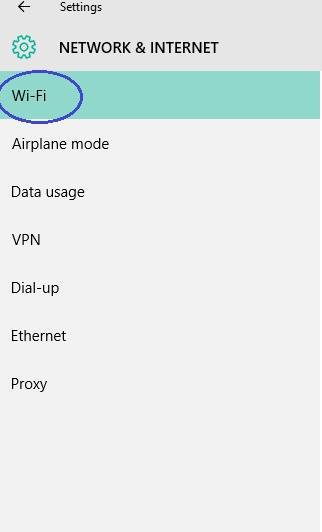
Having persistent / intermittent / sporadic Wifi disconnections with Windows 10?

It may be due to Window's Wifi sense.

How to disable Wifi sense


13435733_1035491116542684_2048651736_n

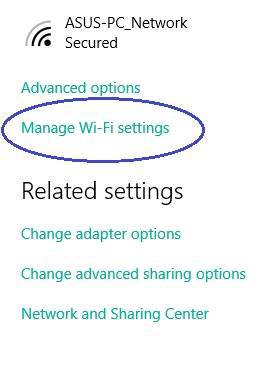
Go to Manage Wifi settings 

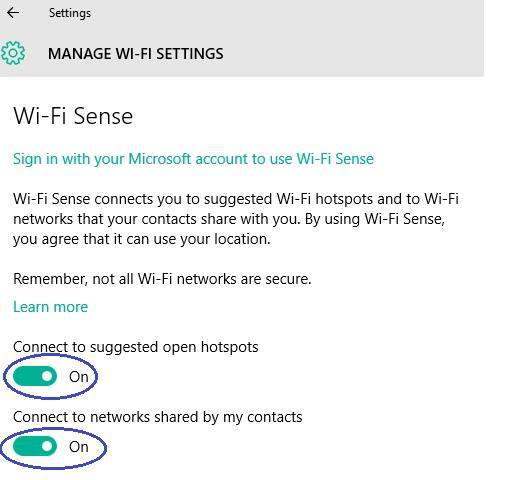
Once there, find and disable the following settings: Connect to suggested open hotspots and Connect to networks shared by my friends. This should fix the annoying issue and you should no longer have any problem with unwanted disconnection from the network you’re using. Just remember to save the changes you’ve just made by clicking on OK/Save.

 
13435955_1035491119876017_1282272291_n
Turn these OFF

13444308_1035491126542683_65330842_n


Good luck!

Thursday, March 12, 2015

Points of Significance in Biology - Nature column

http://www.nature.com/nmeth/journal/v10/n9/full/nmeth.2613.html

http://www.nature.com/collections/qghhqm

Since September 2013 Nature Methods has been publishing a monthly column on statistics aimed at providing reseachers in biology with a basic introduction to core statistical concepts and methods, including experimental design. Although targeted at biologists, the articles are useful guides for researchers in other disciplines as well. A continuously updated list of these articles is provided below.

Importance of being uncertain - How samples are used to estimate population statistics and what this means in terms of uncertainty.

Error Bars - The use of error bars to represent uncertainty and advice on how to interpret them.

Significance, P values and t-tests - Introduction to the concept of statistical significance and the one-sample t-test.

Power and sample size - Using statistical power to optimize study design and sample numbers.

Visualizing samples with box plots - Introduction to box plots and their use to illustrate the spread and differences of samples. See also: Kick the bar chart habit and BoxPlotR: a web tool for generation of box plots

Comparing samples—part I - How to use the two-sample t-test to compare either uncorrelated or correlated samples.

Comparing samples—part II - Adjustment and reinterpretation of P values when large numbers of tests are performed.

Nonparametric tests - Use of nonparametric tests to robustly compare skewed or ranked data.

Designing comparative experiments - The first of a series of columns that tackle experimental design shows how a paired design achieves sensitivity and specificity requirements despite biological and technical variability.

Analysis of variance and blocking - Introduction to ANOVA and the importance of blocking in good experimental design to mitigate experimental error and the impact of factors not under study.

Replication - Technical replication reveals technical variation while biological replication is required for biological inference.

Nested designs - Use the relative noise contribution of each layer in nested experimental designs to optimally allocate experimental resources using ANOVA.

Two-factor designs - It is common in biological systems for multiple experimental factors to produce interacting effects on a system. A study design that allows these interactions can increase sensitivity.

Sources of variation - To generalize experimental conclusions to a population, it is critical to sample its variation while using experimental control, randomization, blocking and replication to collect replicable and meaningful results.